Containers are like virtual machines, but they dispense with the idea of a hypervisor and instead enforce resource separation at the operating system level. In the below image, a standard hypervisor is shown on the left and a Docker Engine hosting different containers is shown on the right.
Comparison of Virtual Machine Versus Containers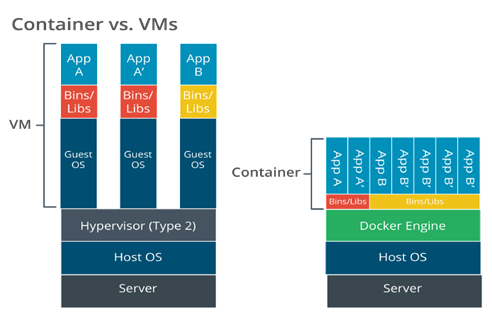 Description
The image is a side-by-side diagram titled “Container vs. VMs,” comparing the architecture of traditional virtual machines (VMs) with the architecture of containers.
On the left is the virtual machine stack from bottom to top:
-
Server (physical machine)
-
Host OS (operating system running on the server)
-
Hypervisor (Type 2) (software that creates and manages VMs)
-
Multiple Guest OS instances, each running within its own VM.
-
Each guest OS has its own Bins/Libs (binaries and libraries).
-
On top of each stack is an App (e.g., App A, App B).
On the right is the containers stack from bottom to top:
Server.
Host OS.
Docker Engine (container runtime).
Shared Bins/Libs (more lightweight and efficient than recreating for each app).
Multiple Apps (App A, App B, App C, etc.) running as isolated containers.
The diagram uses brackets to highlight the separation:
-
On the left, “VM ––” covers the layers involved in a virtual machine (from Guest OS upward).
-
On the right, “Container ––” covers the layers above the Docker Engine.
In the VM architecture, each application requires its own guest operating system layer, leading to more resource use and redundancy.
In the Containers architecture, Docker Engine abstracts the need for separate guest operating systems, allowing isolated applications to utilize the same underlying host OS, making containers more lightweight and efficient compared to VMs.
The OS defines isolated “cells” or containers for each user instance to run in. Each container is allocated CPU and memory resources, but the processes all run through the native OS kernel.
Containerization supports microservices and serverless architecture and is also being widely used to implement corporate workspaces on mobile devices.
Two of the more popular container programs are Docker and Kubernetes. Docker is typically used for the containers themselves, whereas Kubernetes is used to manage containers on the network.
While using containers can greatly reduce the strain on the network, they do contain vulnerabilities that can be exploited to gain access to the network systems. Container vulnerabilities will typically fall under one of these categories:
-
Configuration issues
-
Network policy misconfigurations
-
Application vulnerabilities
Common scans that can be run when PenTesting containers include the following:
-
Vulnerability scanning
- Vulnerability scans will scan the container and its components to identify any potential known vulnerabilities.
-
Configuration audits
- Misconfigurations are a common cause for vulnerabilities. Container scanning tools will attempt to identify misconfigurations that can possibly be exploited.
-
Runtime security
- Containers should be scanned while they are running to identify vulnerabilities that are only present during runtime.
-
Network security
- Containers are often connected to the local network and should be scanned to check for any network security vulnerabilities or misconfigurations.
-
Compliance checks
- Organizations must meet certain requirements to remain in compliance depending on the function of the organization. Containers should be scanned to ensure they meet these compliance checks.
Another type of scan is the sidecar scan; it checks the sidecar container for any potential vulnerabilities. A sidecar container runs alongside the main container and extends and enhances the functionality of the main container without changing it.
Tools that can be used to scan containers for vulnerabilities include Grype and Trivy. Kube-Hunter can also be used, but this program is no longer in active development. Trivy can perform many of the same functions, however.