Web applications are scripts and executables designed to improve the functionality of a website and offer services to clients. Web servers will generally run on standard TCP port 80 and port 443; however, they can be configured to use nontraditional ports as well.
Web application scanners will interact with the web application and examine elements such as form fields and code for identified vulnerabilities and sensitive content. When dealing with web applications, it’s also important to check for exposed or unprotected application programming interface (API) information within the code.
Examining API Requests
An API is a set of commands that is used to send and receive data between systems, such as a client and a server. When used, the API provides an additional layer of security as the client never interfaces directly with the server. For example, when someone requests content from a webpage, the request is sent from the browser to a remote server’s API, as shown in the graphic:
Requesting Content from a Web Server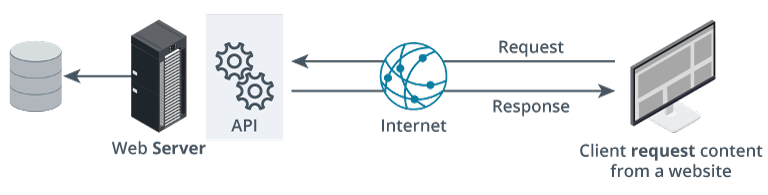 Description
A high-level diagram illustrating the flow of a typical web API request and response cycle between a client and a server.
From right to left, the process is as follows:
On the far right, there is a computer (client) labeled “Client request content from a website.” Arrows indicate that this client sends a “Request” via the Internet.
At the center is an icon of the globe labeled “Internet,” showing bidirectional arrows labeled “Request” (from client to server) and “Response” (from server to client).
The arrows connect to a black server labeled “Web Server,” which is responsible for processing the web request.
The server communicates with an “API” component, depicted by two interlocking gear icons. To the left, the API layer interacts with a cylindrical database icon, illustrating that it retrieves (or stores) data as part of fulfilling the request.
The overall flow demonstrates that when a user requests content from a website, that request travels through the Internet to the web server and API, which may query the database and then return a response back through the same path to the client. This diagram is commonly used to explain how web applications handle client-server interaction, API communications, and data retrieval.
API vulnerabilities are common, so the PenTester should search for exposed information such as an API key in the source code, as shown in the graphic:
Visible API Found in Source Code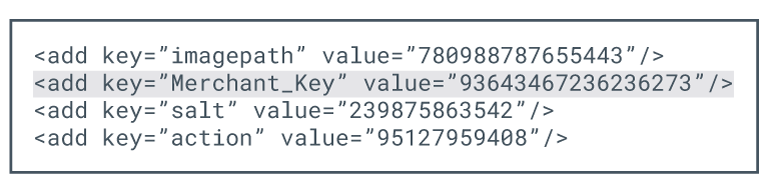 Description
A code snippet from a configuration file, formatted in XML. The snippet contains several lines, each using the
-
imagepath with the value 780988787655443.
-
Merchant_Key with the value 93643467236236273 (this line is highlighted).
-
salt with the value 239875863542.
-
action with the value 95127959408.
An API with the appropriate key and authorization token can allow a malicious actor to gain access to sensitive data.
Scanning for vulnerabilities can be a lengthy, time-consuming process. While some of the scanning process can be done manually, most PenTesters use automated tools to drill through sites for the presence of known vulnerabilities.
The PenTester will most likely scan from the outside looking in to the web server, which is similar to what would be seen by a malicious actor.
Application vulnerability testing methods are commonly grouped into two main categories:
-
Static Application Security Testing (SAST) is done early in the software development life cycle to examine the code for security vulnerabilities. SAST examines the source code itself without running it to identify any potential security vulnerabilities. This early identification allows the developers to address security concerns before the application is deployed into a production environment.
- This type of testing is beneficial as well for organizations using Infrastructure as Code (IaC) platforms. SAST can be used to analyze IaC definition files to identify misconfigurations and security weaknesses in the infrastructure itself.
-
Dynamic Application Security Testing (DAST) is done after the code is placed into production. Unlike SAST, dynamic testing will unearth vulnerabilities that are evident after the code is in production.
- One example of DAST is the mobile scan, which is performed on an application that is installed on a mobile device, such as a cell phone. The mobile scan attempts to mimic real-world user interaction to discover potential security vulnerabilities in mobile apps.
-
Interactive Application Security Testing (IAST) combines aspects of both SAST and DAST to provide a more comprehensive and accurate assessment of an application’s security. IAST analyzes the application’s behavior while it is running to get the most accurate assessments.
-
Software Composition Analysis (SCA) identifies the open-source and third-party libraries and components, along with their versions and licensing information, used in an application. SCA tools can then look up these libraries and components on vulnerability databases to see if there are any known risks.
| Feature | SAST (Static) | DAST (Dynamic) | IAST (Interactive) | SCA (Composition) |
|---|---|---|---|---|
| Full Name | Static Application Security Testing | Dynamic Application Security Testing | Interactive Application Security Testing | Software Composition Analysis |
| Testing Type | White-box (Inside-out) | Black-box (Outside-in) | Gray-box (Interactive) | Dependency Analysis |
| Target | Source Code / Bytecode | Running Application / API | Running App + Code Flow | Third-party Libraries / OSS |
| Phase | Development / Coding | Testing / Staging / Prod | QA / Functional Testing | Entire SDLC |
| Strengths | Finds flaws early; shows exact line of code. | Finds runtime/config issues; language agnostic. | Highly accurate; combines SAST & DAST benefits. | Identifies known CVEs in libraries & licensing. |
| Weaknesses | High false positives; doesn’t find runtime issues. | Finds flaws late; no access to code/logic. | Requires agent; can impact performance. | Only finds ‘known’ issues in existing libraries. |
Today, many web applications adhere to industry standards when creating interfaces and backend applications. However, they can still be vulnerable to issues such as insecure server configuration, Cross-Site Scripting, SQL injection (SQLi), and path traversal.
To take the guesswork out of this process and continuously monitor systems for vulnerabilities, the PenTester can use the Security Content Automation Protocol (SCAP). SCAP is a U.S. standard used to ensure applications meet mandated security requirements. Scanning uses a predetermined security baseline that checks for vulnerabilities, either on site or cloud based. Once identified, the next step is to mitigate the vulnerabilities to decrease overall organizational risk.